Introduction
Signs your email has been hacked are often easy to miss at first, but ignoring them can lead to serious security risks. Your email account is the gateway to your online identity, including banking, social media, and personal data.
Hackers target email accounts to reset passwords, steal sensitive information, and launch further attacks. Recognizing the warning signs early can help you act quickly and prevent further damage.
Table of Contents
Common Signs Your Email Has Been Hacked
1. Unrecognized Login Activity
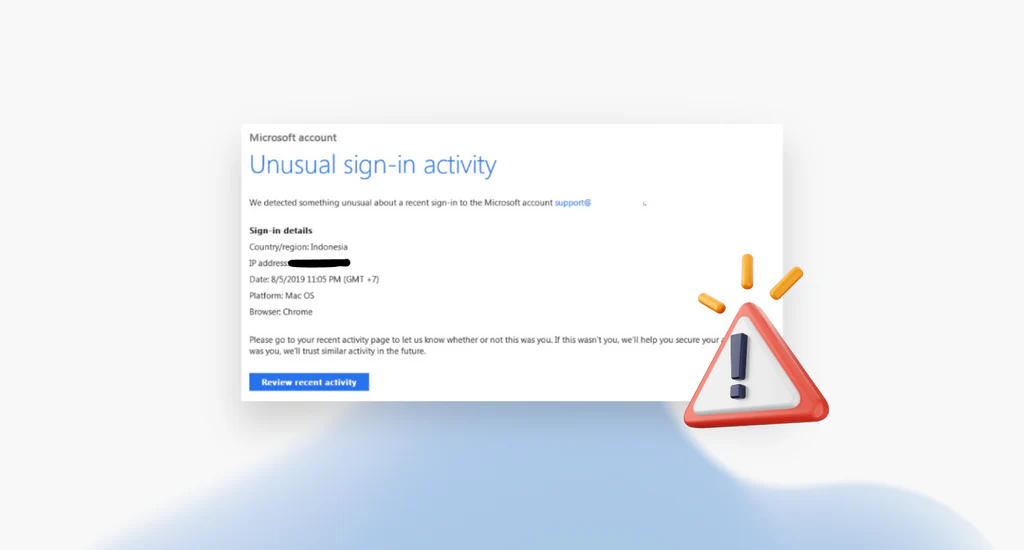
One of the most common signs your email has been hacked is unusual login activity. Many email providers show login history, including devices and locations.
If you notice logins from unknown locations or devices, it’s a strong indication your account may be compromised.
2. Password Suddenly Stops Working
If your password no longer works and you didn’t change it, this is a major warning sign. Hackers often change passwords immediately after gaining access to lock you out.
3. Emails You Didn’t Send
If your contacts receive strange or spam emails from your account, it’s a clear sign your email has been hacked.
Attackers often use compromised accounts to spread phishing links, scams, or malware.
4. Unexpected Password Reset Requests
Receiving password reset emails for accounts you didn’t request is another red flag. This could mean someone is attempting to access your accounts using your email.
5. Missing or Deleted Emails
Hackers may delete emails to hide their activity. If important messages suddenly disappear or your inbox looks unusual, investigate immediately.
6. Suspicious Account Changes
Changes to your recovery email, phone number, or security settings without your knowledge are serious signs your email has been hacked.
Why Email Hacks Are Dangerous
Your email account is connected to many other services. If hackers gain access, they can reset passwords, steal sensitive data, and take over other accounts.
Many cyberattacks, such as credential stuffing attacks, rely on compromised email accounts.
What To Do If Your Email Has Been Hacked
Change Your Password Immediately
Create a strong, unique password that you haven’t used before. Avoid common words or patterns.
Enable Two-Factor Authentication
Adding extra security is critical. Learn more about what-is-two-factor-authentication-2fa and how it protects your account.
Check Account Activity
Review recent logins and remove any unknown devices or sessions.
Scan Your Device for Malware
Run a full antivirus scan to ensure your device is not infected with malicious software.
Secure Your Other Accounts
If you reuse passwords, attackers may access multiple accounts. Read how-hackers-crack-weak-passwords and update all your credentials.
How to Prevent Email Hacking
- Use strong and unique passwords
- Enable two-factor authentication
- Avoid clicking suspicious links
- Keep your software updated
- Monitor account activity regularly
After an attack, follow this step-by-step guide to recover a hacked email account quickly and securely.
Real-Life Example
For example, if a hacker gains access to your email, they can reset passwords for your banking, social media, or shopping accounts.
This means one compromised email account can lead to multiple security breaches.
You can check if your email has been exposed in a data breach using
Have I Been Pwned.
Can Hackers Access Your Email Without You Knowing?
Yes, hackers can access your email silently using phishing attacks, malware, or stolen credentials.
Understanding these risks is important. Many of these methods are explained in our guide on how-hackers-crack-weak-passwords password hacking techniques
Limitations of Email Security
Even with strong passwords, your email is not completely safe. Attackers can still use phishing attacks or malware to bypass security.
This is why combining multiple protections like two-factor authentication and safe browsing habits is essential.
How to Check If Your Email Has Been Hacked
If you suspect your email has been hacked, start by checking recent login activity and security settings. Most email providers allow you to review devices and locations that accessed your account.
You can also search for your email address in data breach databases to see if your credentials have been exposed. Taking action early can prevent further damage.
If you’re unsure whether your account is compromised, check out our guide on how hackers hack email accounts.
Final Thoughts
Recognizing the signs your email has been hacked can help you take action quickly and minimize damage.
The sooner you detect suspicious activity, the easier it is to secure your account and prevent further problems. Staying alert and following good security practices is key to protecting your digital identity.
If you ignore the signs your email has been hacked, attackers may gain long-term access to your accounts.
Understanding the signs your email has been hacked helps you act quickly and prevent serious damage. To stay safe from cyber threats, read our complete guide on how to protect your email account from hackers, where we cover proven strategies, tools, and best practices.
FAQ
What are the first signs your email has been hacked?
Unusual login activity, password changes, and emails you didn’t send are the most common early signs.
Can hackers access my email without my password?
Yes, through phishing attacks or malware, hackers can gain access without directly knowing your password.
What should I do first if my email is hacked?
Immediately change your password and enable two-factor authentication.
How can I check if my email is compromised?
Check login history, security settings, and look for suspicious activity such as unknown devices or deleted emails.
What happens if my email is hacked?
Hackers can access your personal data, reset passwords for other accounts, and use your email to launch further attacks.
How do hackers get access to email accounts?
Hackers can gain access through phishing attacks, malware, data breaches, or by guessing weak passwords.
Leave a Reply