Introduction
Your email account is the gateway to your digital life. From banking to social media, everything is connected to it. That’s why understanding how to protect your email account from hackers is more important than ever.
Cybercriminals use techniques like phishing, malware, and password attacks to gain access. In this complete guide, you’ll learn how to secure your email and prevent unauthorized access.
If you’re wondering how to protect your email account from hackers, the key is combining strong passwords, awareness, and security tools.
Table of Contents
Why Email Security Is So Important
If a hacker gains access to your email, they can:
- Reset passwords for other accounts
- Steal sensitive data
- Impersonate you
- Lock you out completely
Common Mistakes That Put Your Email at Risk
Many users unknowingly make mistakes that make it easier for hackers to access their accounts.
Some common mistakes include:
- Reusing the same password across multiple websites
- Ignoring security alerts from email providers
- Clicking on suspicious links or attachments
- Not enabling two-factor authentication
- Using outdated devices or software
Avoiding these mistakes is a critical part of learning how to protect your email account from hackers.
Common Email Security Mistakes to Avoid
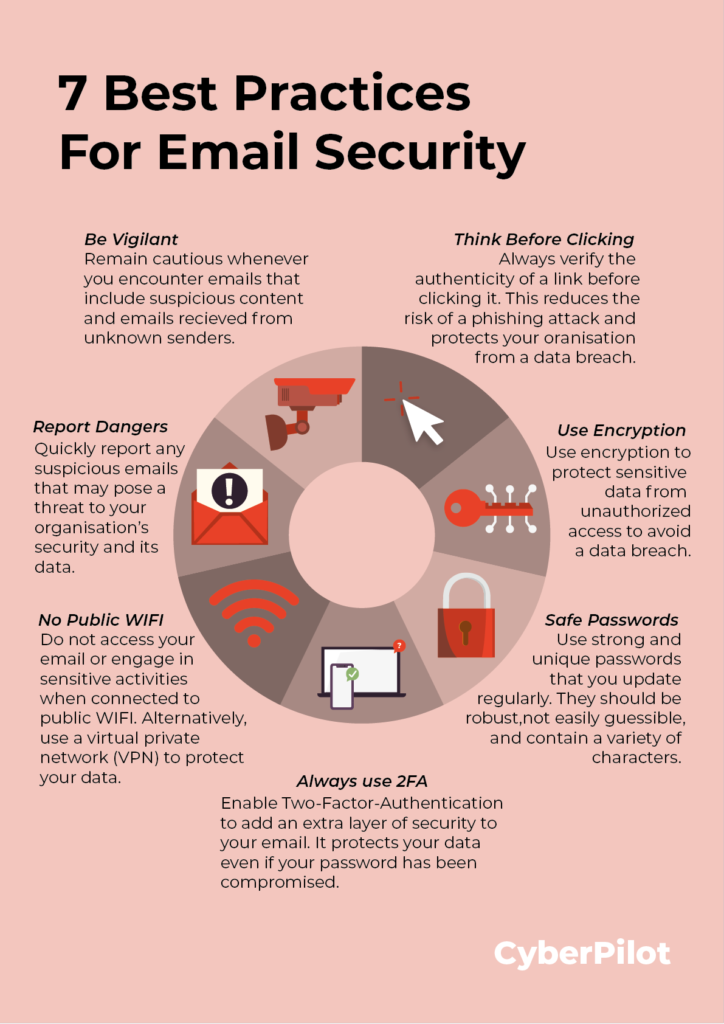
Many people unknowingly make mistakes that put their email accounts at risk. One of the most common mistakes is reusing the same password across multiple accounts. If one account gets compromised, hackers can easily access your email and other services.
Another mistake is ignoring security alerts from your email provider. These alerts often indicate suspicious login attempts or unusual activity. Failing to act on them can lead to account compromise.
Using public Wi-Fi without protection is also risky. Hackers can intercept your data on unsecured networks. Always use a VPN or avoid logging into sensitive accounts on public networks.
Lastly, not enabling two-factor authentication (2FA) is a major security gap. Even if your password is stolen, 2FA adds an extra layer of protection.
Common Ways Hackers Attack Email Accounts
Before you can protect yourself, you need to understand the threats.
🔓 Phishing Attacks
Fake emails trick you into entering your login details.
👉 Learn more: How hackers hack email accounts
According to cybersecurity experts at Google, phishing remains one of the most common attack methods.
🔑 Weak Password Exploits
Simple passwords can be cracked within seconds.
👉 Related: How hackers crack weak passwords
🔁 Credential Stuffing
Reused passwords from data breaches are used to access your account.
👉 See: What is credential stuffing?
🦠 Malware and Keyloggers
Malicious software can steal your credentials silently.
📶 Public Wi-Fi Attacks
Hackers intercept data on unsecured networks.
10 Proven Ways to Protect Your Email Account
Here’s exactly how to protect your email account from hackers:
1. Use Strong and Unique Passwords
Create passwords that include:
- Uppercase and lowercase letters
- Numbers
- Symbols
Avoid using the same password across multiple sites.
2. Enable Two-Factor Authentication (2FA)
This adds an extra layer of security.
👉 Read: What is two-factor authentication (2FA)?
3. Avoid Clicking Suspicious Links
Never click on unknown links in emails.
Always verify:
- Sender address
- URL authenticity
4. Use a Password Manager
Password managers help you:
- Generate strong passwords
- Store them securely
5. Keep Your Devices Secure
- Install antivirus software
- Update your system regularly
- Avoid downloading unknown files
6. Be Careful with Public Wi-Fi
Avoid logging into email accounts on public networks.
If needed, use a VPN.
7. Monitor Account Activity
Check:
- Login history
- Security alerts
- Unknown devices
👉 If something seems off: Signs your email has been hacked
8. Set Up Recovery Options
Make sure your recovery email and phone number are up to date.
9. Log Out from Shared Devices
Always log out when using public or shared computers.
10. Educate Yourself About Scams
Stay updated on:
- Phishing techniques
- Social engineering tactics
What to Do If Your Email Is Hacked
If your account is already compromised, act immediately.
👉 Follow this step-by-step guide:
➡️ Recover hacked email account in 7 steps
You can also check password strength using tools like Have I Been Pwned to see if your credentials were exposed.
Signs Your Email May Be at Risk
Watch for these warning signs:
- Unusual login alerts
- Password reset emails
- Unknown sent messages
Additional Email Security Tips how to protect your email account from hackers
To further protect your email account from hackers, consider these extra precautions:
- Regularly update your passwords every few months
- Avoid saving passwords in browsers on shared devices
- Enable login alerts for suspicious activity
- Use encrypted email services when possible
These small steps can significantly improve your email security and reduce the chances of unauthorized access.
Final Thoughts
Learning how to protect your email account from hackers is one of the most important steps you can take to secure your online life.
By following the strategies in this guide, you can significantly reduce your risk and stay protected against cyber threats.
Understanding how to protect your email account from hackers is essential in today’s digital world.
By following this guide on how to protect your email account from hackers, you can stay ahead of cyber threats and secure your digital identity.
FAQ
How can I secure my email account completely?
Use strong passwords, enable 2FA, avoid phishing links, and monitor account activity regularly.
What is the safest email security method?
Combining strong passwords with two-factor authentication offers the best protection.
Can hackers access my email without a password?
Yes, through phishing, malware, or session hijacking.
Leave a Reply