Introduction
Understanding how hackers crack weak passwords is important for protecting your online accounts. Many users still rely on simple passwords such as “123456”, “password”, or personal information like birthdays and names. Weak passwords are one of the most common causes of online account breaches. Many users still rely on simple passwords such as “123456,” “password,” or personal information like birthdays and names. These passwords may seem convenient, but they make it much easier for cybercriminals to gain unauthorized access to accounts.
Understanding how hackers crack weak passwords can help you recognize the risks and take steps to strengthen your online security. Hackers use a variety of techniques and automated tools to guess or steal passwords quickly. In this guide, we will explore the most common methods attackers use and how you can protect your accounts from these threats.
Table of Contents
Why Weak Passwords Are Dangerous
Weak passwords are easy targets for hackers because they can be guessed quickly by automated programs. Many attackers rely on tools that can test thousands or even millions of password combinations within minutes.
When users reuse the same password across multiple websites, a single data breach can expose many accounts at once. For example, if a hacker obtains login credentials from one compromised website, they may attempt to use those credentials on other platforms such as email, banking, or social media accounts.
This is why understanding how hackers crack weak passwords is critical for protecting personal and business accounts online. Hackers use several techniques to crack weak passwords quickly.
Common Methods Hackers Use to Crack Passwords
Hackers rely on several techniques to break into accounts. Most of these methods take advantage of predictable or reused passwords. According to cybersecurity guidance from CISA, using strong passwords and enabling multi-factor authentication significantly reduces the risk of password-based attacks.
1. Brute Force Attacks
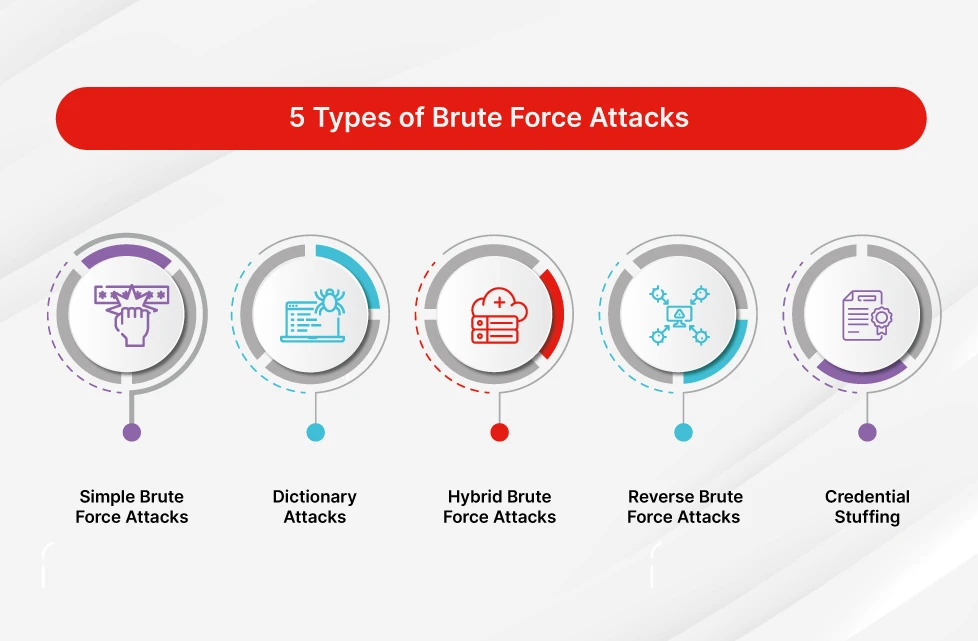
A brute force attack involves trying every possible combination of characters until the correct password is found. Hackers use automated software to test thousands of passwords per second.
Simple passwords such as:
- 123456
- password
- qwerty
can be cracked in seconds using brute force tools.
Longer and more complex passwords significantly increase the time required for attackers to guess them.
2. Dictionary Attacks
Dictionary attacks are similar to brute force attacks but focus on commonly used words and phrases. Hackers use large databases of known passwords and try them automatically.
Many people choose passwords based on:
- common words
- names
- sports teams
- simple phrases
Because these passwords appear in hacker databases, they can often be cracked quickly.
3. Credential Stuffing
Credential stuffing is another common technique used to access accounts. In this attack, hackers use stolen usernames and passwords from previous data breaches to attempt logins on other websites.
Because many people reuse passwords across multiple platforms, attackers can successfully access accounts without needing to guess the password.
You can learn more about this attack in our guide on what credential stuffing is and how it works.
4. Phishing Attacks
Phishing attacks trick users into revealing their passwords by pretending to be trusted organizations. Hackers may send fake emails that appear to come from banks, social media platforms, or online services.
These messages often contain links to fraudulent websites designed to capture login information.
Once the victim enters their credentials, attackers gain immediate access to the account. Learning how hackers crack weak passwords can help you create stronger login credentials.
5. Malware and Keyloggers
Some hackers install malicious software on a victim’s device to capture passwords automatically. One common type of malware is a keylogger, which records every keystroke typed on a keyboard.
If a keylogger is installed on a computer, attackers can capture login credentials for many accounts without the user noticing.
Signs Your Password May Be Compromised
There are several warning signs that someone may have gained access to your password.
Common indicators include:
- Unrecognized login alerts
- Password reset notifications you did not request
- Changes to account settings or profile information
- Emails sent from your account without your knowledge
If you notice any of these signs, it is important to change your password immediately and review your account security settings.
How to Create Strong and Secure Passwords
Using strong passwords is one of the best ways to protect your online accounts from hackers.
Here are several best practices to follow:
Use Long Passwords
Longer passwords are harder to crack. Aim for at least 12–16 characters.
Avoid Common Words
Do not use simple dictionary words, names, or predictable phrases.
Combine Different Characters
A strong password should include a mix of:
- uppercase letters
- lowercase letters
- numbers
- special characters
Use Unique Passwords
Never reuse the same password across multiple accounts. If one account is compromised, attackers could gain access to other accounts using the same credentials.
Enable Two-Factor Authentication (2FA)
Two-factor authentication adds an extra layer of security by requiring a second verification step when logging in.
Even if a hacker steals your password, they will still need the second authentication factor to access your account.
To find out more about Two factor authentication (2FA) please read my complete guide here what is two-factor authentication (2FA)?
Use a Password Manager
Password managers help generate and store strong, unique passwords securely. This reduces the risk of password reuse and makes it easier to manage multiple accounts.
Real Examples of Password Attacks
Large data breaches have shown how dangerous weak passwords can be. When attackers obtain millions of stolen login credentials from breached websites, they can use automated tools to access other accounts where users reused the same passwords.
Final Thoughts
Weak passwords remain one of the biggest security risks for online users. Cybercriminals rely on automated tools and social engineering techniques to exploit weak login credentials.
By understanding how hackers crack weak passwords, you can take steps to strengthen your account security. Using strong, unique passwords and enabling additional protections like two-factor authentication can significantly reduce the risk of unauthorized access.
Taking a few simple precautions today can help keep your personal information and online accounts safe from cyber threats. Understanding how hackers crack weak passwords is the first step toward improving your cybersecurity.
To stay safe from cyber threats, read our complete guide on how to protect your email account from hackers, where we cover proven strategies, tools, and best practices.
FAQ: How Hackers Crack Weak Passwords
What is the most common way hackers crack weak passwords?
The most common method hackers use to crack weak passwords is brute force attacks. In this technique, automated programs try thousands or millions of password combinations until the correct one is found. Simple passwords such as “123456” or “password” can often be cracked within seconds.
Can hackers guess your password easily?
Yes, hackers can guess passwords easily if they are simple or commonly used. Passwords based on names, birthdays, or dictionary words are especially vulnerable to attacks such as dictionary attacks and credential stuffing.
How long does it take hackers to crack a weak password?
Weak passwords can sometimes be cracked in seconds using automated hacking tools. However, strong passwords with a mix of letters, numbers, and special characters can take years to break using the same methods.
What tools do hackers use to crack passwords?
Hackers use various tools such as password-cracking software, botnets, and automated scripts to test large numbers of password combinations quickly. These tools are often used in brute force attacks and dictionary attacks.
How can you protect your passwords from hackers?
You can protect your passwords by using long and unique passwords, enabling two-factor authentication (2FA), avoiding password reuse, and using a trusted password manager to store secure login credentials.
Leave a Reply