
Two-factor authentication (2FA) is a security method that requires two forms of verification before you can access an account—typically your password and a one-time code sent to your phone or generated by an app.
It adds an extra layer of protection, making it much harder for hackers to break into your accounts even if they know your password.
2FA = password + second verification step
– It protects against hacking even if passwords are stolen
– Common methods: SMS codes, authenticator apps, security keys
– Recommended for all important accounts
Two-factor authentication also protects accounts from credential stuffing attacks that use stolen login credentials.
Table of Contents
What Is Two-Factor Authentication (2FA)?
Two-factor authentication (2FA) is a security system that requires two different types of verification before granting access to an account. Instead of relying only on a password, users must provide an additional verification factor.
Authentication factors generally fall into three categories:
- Something you know – such as a password or PIN
- Something you have – such as a smartphone or security token
- Something you are – such as a fingerprint or facial recognition
By combining two of these factors, two-factor authentication makes it much harder for hackers to access accounts.
Two factor authentication significantly reduces the risk of unauthorized access.
Enabling two factor authentication is one of the simplest ways to improve your online security.
How Two-Factor Authentication Works
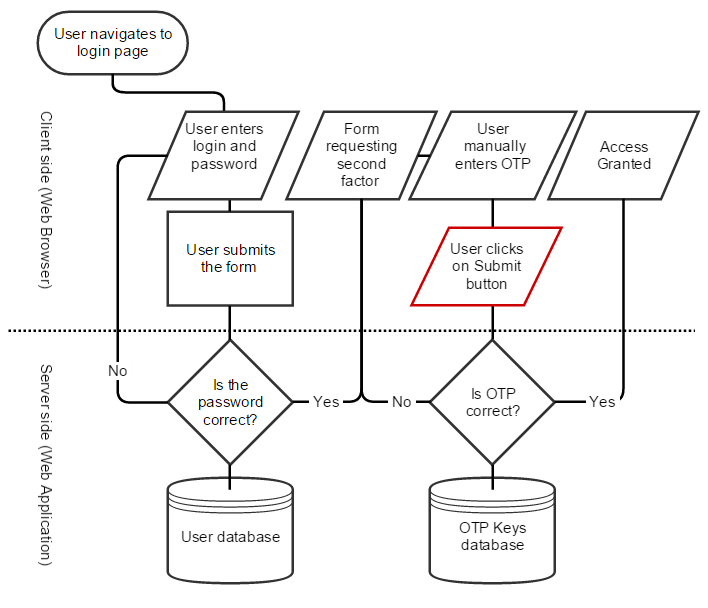
Two-factor authentication works in two steps:
1. You enter your username and password
2. You verify your identity using a second factor (code, app, or device)
For example, after entering your password, you may receive a temporary verification code on your phone. You must enter that code before the system allows access to your account.
Even if a hacker steals your password, they will still need the second authentication factor to log in. Two factor authentication is widely used by major platforms like Google, Facebook, and banking apps to protect user accounts.
To better understand these risks, read our guide on how hackers crack weak passwords and why simple passwords are dangerous.
Types of Two-Factor Authentication
Several types of two-factor authentication methods are commonly used today. Without two factor authentication, even strong passwords can be vulnerable to hacking attempts.
SMS Verification Codes
One of the most common 2FA methods sends a one-time code to your mobile phone via text message. You must enter this code to complete the login process.
Authentication Apps
Authentication apps such as Google Authenticator or Microsoft Authenticator generate temporary codes that change every 30 seconds. These apps are generally considered more secure than SMS verification.
If you are concerned about privacy, check out our guide on how to block webcam spying to secure your device.
Hardware Security Keys
Hardware security keys are physical devices that must be connected to your computer or tapped on your phone to verify your identity. They provide a very strong level of protection.
Is Two-Factor Authentication Safe?
Yes, two-factor authentication is one of the safest ways to protect your accounts. While no system is 100% secure, 2FA significantly reduces the risk of unauthorized access.
However, methods like SMS can be vulnerable to SIM swapping, which is why authenticator apps or security keys are recommended.
Why Two-Factor Authentication Is Important
Two-factor authentication significantly improves account security. Passwords alone are often vulnerable to attacks such as phishing, brute force attacks, or credential stuffing.
By requiring a second verification step, 2FA prevents hackers from accessing accounts even if they obtain login credentials.
For example, attackers who successfully crack weak passwords may still be unable to log in if two-factor authentication is enabled. Many cybersecurity experts recommend enabling two factor authentication on all important accounts.
Examples of Two Factor Authentication in Everyday Use
Many online platforms now support two-factor authentication, including:
- Email accounts
- Social media platforms
- Online banking services
- Cloud storage services
- Cryptocurrency exchanges
These services encourage users to enable 2FA to protect sensitive information and prevent unauthorized access. For example, Google explains how two factor authentication works in detail on its official security page:
Google 2-Step Verification guide.
How to Enable Two-Factor Authentication
Most websites and online services allow users to enable two-factor authentication through their security settings.
Typical steps include:
- Log in to your account settings
- Locate the Security or Privacy section
- Enable Two-Factor Authentication (2FA)
- Choose your preferred verification method
- Save backup recovery codes
Once enabled, your account will require a second verification step when logging in.
Real-Life Example of Two Factor Authentication
For example, when you log into your Google account, you first enter your password. Then, you receive a verification code on your phone or authentication app. Only after entering that code can you access your account.
This extra step prevents hackers from accessing your account even if they know your password. After an attack, follow this step-by-step guide to recover a hacked email account quickly and securely.
Limitations of Two Factor Authentication
While two factor authentication significantly improves security, it is not completely foolproof. Attackers can still use phishing attacks, SIM swapping, or malware to bypass 2FA in some cases.
For example, in credential stuffing attacks, hackers may trick users into entering both their password and verification code on fake websites. Learn more about how attackers use stolen credentials in our guide on credential stuffing.
To stay fully protected, users should combine two factor authentication with strong passwords and safe browsing habits.
Final Thoughts
Two-factor authentication is one of the simplest and most effective ways to protect online accounts from cyber threats. By requiring two forms of verification, 2FA adds an additional security layer that helps prevent unauthorized access.
Understanding what two-factor authentication (2FA) is and how it works can help users protect their personal data and online accounts from hackers.
Enabling two-factor authentication is a small step that can make a significant difference in keeping your digital identity secure. For maximum protection, combine two-factor authentication with a strong password manager and regular security checks.
To stay safe from cyber threats, read our complete guide on how to protect your email account from hackers, where we cover proven strategies, tools, and best practices.
FAQ
What does two-factor authentication mean?
Two-factor authentication means verifying your identity using two separate methods, typically a password and a temporary code sent to your phone or authentication app.
Why is two-factor authentication important?
Two-factor authentication helps prevent hackers from accessing accounts even if they steal or guess your password.
Is two-factor authentication better than a password?
Yes. Using both a password and a second verification factor provides significantly stronger protection than relying on passwords alone.
Can hackers bypass two-factor authentication?
Although rare, some advanced attacks can attempt to bypass 2FA. However, accounts protected with two-factor authentication are still much harder to compromise.
What happens if I lose my 2FA device?
If you lose access to your 2FA device, most services provide backup codes or recovery options. It is important to save backup codes securely when enabling two factor authentication.
Which 2FA method is the most secure?
Authentication apps and hardware security keys are considered the most secure forms of two-factor authentication because they are less vulnerable to attacks like SIM swapping.
Leave a Reply